GPS Voice Route - GPS Camera
- 4.1
- Rating
- 100.00K
- Installs
- Free
- Price
 Analysis by App-foxy
I approached GPS Voice Route - GPS Camera as a practical travel and local-navigation tool rather than as a replacement for every map app on my phone. Its core idea is straightforward: combine spoken GPS guidance with maps, route finding, and a camera-related navigation element in one app. That combination may appeal to someone who wants a focused driving companion, but it also makes trust and control especially important because navigation apps are used while moving, often in unfamiliar places, and can influence real decisions.
The app is developed by App Aviator_GPS Maps & Navigation and is available as a free download for Android users. It is rated for Everyone, which makes its general audience broad, although the practical experience is still most relevant to drivers, walkers, commuters, and travelers who want voice assistance. The current release is version 1.0.7, and it requires Android 8.0 or later.
My overall impression is cautiously positive. The app has a clear everyday purpose and a useful mix of navigation-oriented tools, but I would treat it as something to test carefully before depending on it for a long trip. A navigation app earns confidence through dependable directions, understandable choices, and transparent handling of sensitive moments. Those are the areas I would pay attention to first.
You May Also Like

 Blood Strike: 2.5 Anniversary
Blood Strike’s Loadouts Turn Every Drop Into a Tactical Gamble
A close look at Blood Strike’s custom loadouts: how fast access to signature weapons reshapes its battle royale rhythm, rewards preparation, and narrows the gap between fights.

 Pandora - Music & Podcasts
Pandora’s Music Is Easy to Start, but Harder to Recover
Pandora’s strength is its low-effort path from a seed to a station. Its weak spot is how much confidence it asks you to place in connection, setup, and quiet recovery.

 8 Ball Pool
 Is Built on Rivalries, Rematches, and Routine
A close look at the rivalries, rematches, shared routines, and unanswered safety questions that turn a quick pool match into a persistent mobile community.

 Samsung Music
’s Quiet Strength Is Playing What You Already Own
Its reach comes less from spectacle than from dependable access to a personal library. That simplicity is both the app’s strongest retention engine and its ceiling.

 AccuWeather: Weather Radar
AccuWeather Review: A Quick, Clear Forecast for Everyday Decisions
For everyday plans, the best forecast is the one you can understand quickly. AccuWeather makes rain timing, radar, and local conditions easy to act on, with a few trade-offs.

 Hill Climb Racing
Why Hill Climb Racing Still Turns Crashes Into One More Run
A tiny car, a bumpy hill and one more upgrade: Hill Climb Racing keeps resurfacing because its simple chaos makes every near-miss feel personal.
More From Our News Desk



What the app is trying to do in everyday travel
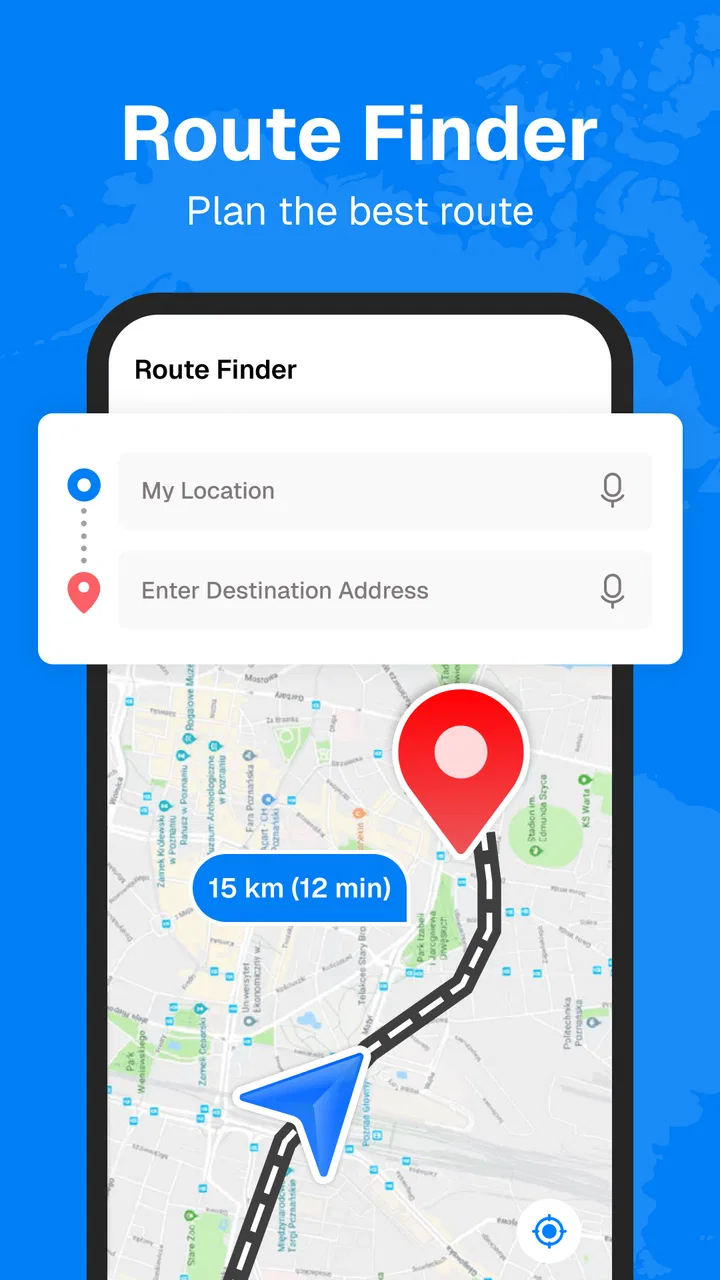
The most appealing part of GPS Voice Route - GPS Camera is the attempt to keep several travel tasks together. Instead of switching between a map, a route planner, and a separate camera utility, the app presents itself as a single place for voice GPS navigation, map viewing, and finding a route. That can be convenient when I am preparing to leave and want fewer distractions on the dashboard.
Voice guidance is particularly useful when I am driving through a busy area. Looking down at a screen to check every turn is distracting, while spoken instructions let me keep more attention on traffic. The value is not simply that the app can show a route; it is that the route can be followed without constantly reading the display. I would still use the map before setting off, because voice prompts are easier to understand when I already know the general direction.
The camera reference gives the app a slightly different identity from a basic route finder. In practical terms, I would be interested in using that part when preparing a visual record of a journey, checking surroundings, or combining navigation with a camera-based view. I would not assume that a camera-related tool replaces a dedicated dash camera or a professional navigation system. Those products usually have more specialized controls, while this app seems aimed at convenience.
A realistic use case would be a weekend drive to a place I have never visited. Before leaving, I would enter the destination, inspect the proposed route, and check that the spoken guidance is enabled. Once moving, I would keep the phone mounted securely and use the audio prompts for ordinary turns. If the road layout became confusing, I would stop safely before examining the map rather than trying to operate the app in traffic.
For walking, the same approach can work differently. Voice directions may be helpful when I am carrying bags or navigating an unfamiliar neighborhood, but pedestrians need to remain aware of crossings, bicycles, and changing access points. A route that looks simple on a screen can still require local judgment. I see the app as an assistant, not as a substitute for observing the street.
Where the focused design helps
People who dislike jumping between several travel apps may appreciate the compact concept. A single navigation tool can make the preparation stage less confusing, especially for someone who only needs ordinary route guidance and does not want a large collection of unrelated travel features. The free entry point also makes it easy to try the workflow before deciding whether it fits.
The app has reached over 10 thousand installs, so it is not an entirely unknown download, but it is still a relatively small presence compared with the biggest mapping services. Its average rating is currently 0.0, which gives me a reason to be measured rather than assuming that the experience has already been broadly validated by user feedback. I would test it on familiar roads first and only then consider using it in a demanding situation.
That testing approach matters because navigation quality is not judged by appearance alone. A clean map can still be inconvenient if route instructions arrive too late, if the chosen path does not suit the vehicle, or if the application makes destination entry awkward. I would look for clear turn timing, readable route changes, and a simple way to recover after a missed turn.
Controls and trust deserve attention
Navigation apps operate in sensitive circumstances. Location information can reveal where I live, work, shop, or spend time, while camera access can feel even more personal. My first step with this app would therefore be to read every Android permission prompt instead of approving everything automatically. I would allow only what is necessary for the function I intend to use, and I would revisit those choices if I stopped using the camera-related feature.
This is not a claim about permissions that are not visible in the app experience. It is simply a sensible habit for any location-based tool. The important point is that I should be able to make the choice consciously. If a feature asks for access that does not seem connected to the task I selected, I would pause and investigate before continuing.
The same principle applies to account controls and settings. I would look for straightforward options involving notifications, location behavior, camera access, and any purchase-related screen. A trustworthy experience is easier to judge when the user can understand what is active and change it without hunting through unrelated menus. I prefer apps that make these choices visible at the moment they matter.
The developer name, App Aviator_GPS Maps & Navigation, clearly signals the product’s purpose, but a developer label alone is not a privacy explanation. I would judge the app through the controls and notices presented on the device, not through assumptions based on its name. That distinction is important because navigation tools handle information that can be personally revealing even when the app itself feels simple.
Moments when privacy choices matter most
The most data-sensitive moment is usually the first location request. If I am only browsing a map or preparing a route at home, I would consider whether location access is needed immediately or whether I can enter a destination manually. If the app needs location while I am actively navigating, I would enable the access required for that task and disable it later if continuous access is no longer useful.
Camera use deserves a separate check. I would not grant camera access merely because the app includes the word “Camera” in its name. I would first open the relevant function and confirm what I am trying to do. If I only need spoken directions, I would keep the camera permission off. If I want to use the camera feature, I would pay attention to the Android indicator and close the feature when finished.
Another sensitive point is route history or saved destinations. I would avoid storing locations that I do not need to revisit, particularly private addresses or places connected to other people. When an app offers a convenient saved-location workflow, convenience can quietly become a record of personal routines. My preference is to save only repeat destinations and remove them when they are no longer useful.
Travel also creates moments where a user may be tempted to interact while moving. I would set the route before starting, use a stable phone mount, and pull over before changing destinations or investigating an unexpected instruction. This is both a safety practice and a privacy practice: fewer frantic taps mean fewer accidental approvals, purchases, or changes made without reading the screen.
How I would test it before trusting a long journey
I would begin with a short, familiar route that includes a normal turn, a roundabout, and a destination with a clear entrance. That test reveals more than simply opening the map. I would listen for whether spoken instructions are understandable, check whether the visual route agrees with the audio, and see how easily I can recover after intentionally taking a different street.
Next, I would try the app without relying on it as my only source of guidance. A second map application or a quick look at the surroundings can act as a sanity check during the first few trips. This is not because the app is necessarily unreliable; it is because every navigation service can encounter outdated roads, temporary closures, unusual addresses, or a route that is technically valid but inconvenient.
I would also test the app at home with the phone connected to the accessories I normally use in the car. Some navigation experiences become less comfortable when audio is routed through a vehicle system, when the screen dims, or when another application takes over sound. Those are practical compatibility questions that are better answered before an airport run or an unfamiliar rural drive.
If the camera function is important to me, I would test it separately from navigation. I would check whether switching between the route and camera view feels clear, whether the phone remains easy to operate, and whether I can exit the camera mode without losing the route context. The best combined tool is not the one with the most functions; it is the one that lets me move between functions without confusion.
Free to start, but purchases change the decision
The app is free to download, which lowers the barrier to trying it. However, in-app purchases range from $9.99 to $119.99 per item. That is a wide span, so I would inspect the purchase screen carefully before confirming anything. I would want to know exactly what each option unlocks, whether it is a one-time purchase or a recurring commitment, and whether the paid element is essential to the way I plan to use the app.
I would be especially cautious about tapping a premium button while preparing to drive. Navigation screens are not the right place to make a rushed financial decision. I would review the offer at home, compare it with the free experience, and use Android purchase protections so that an accidental tap is less likely to become an unwanted charge.
The price structure also affects who should choose this app. Someone who only needs occasional voice guidance may find the free version sufficient for testing and short trips. Someone expecting a complete, highly polished navigation system should compare the total cost of the features they need with established map services that already include route planning as part of their normal experience.
How it compares with familiar alternatives
Compared with a standard map application, GPS Voice Route - GPS Camera appears more focused on combining navigation with camera-oriented use. That can be attractive if I specifically want those functions in one place. The trade-off is that larger mapping platforms often feel more mature in areas such as place information, public transit coverage, traffic context, business details, and community corrections.
A dedicated driving navigator may be a better choice for someone who spends many hours on the road and needs advanced lane guidance, vehicle-specific routing, extensive offline planning, or highly detailed traffic tools. I would not choose this app solely because it has voice prompts if my daily work depends on specialized navigation features.
On the other hand, a large general-purpose map can feel excessive for a user who wants a simple route and a focused interface. If I am traveling occasionally and value a compact tool more than a broad ecosystem, this app may be easier to approach. The right choice depends on whether the camera element and straightforward navigation workflow matter more to me than the depth of a larger alternative.
There is also a difference between route planning and route judgment. No app can understand every temporary road condition, private access restriction, or local hazard perfectly. I would compare the suggested path with road signs and common sense, especially near construction, school zones, mountain roads, or places where a destination has several entrances.
Who will benefit, and who should skip it
I can see this app working well for a casual driver who wants to try voice navigation without committing to a complex service. It may also suit a traveler who likes the idea of having maps, route finding, and a camera-related tool close together. The Everyone age rating makes it broadly approachable, though younger users should still follow local safety rules and avoid operating a phone while walking or riding in risky conditions.
I would recommend a different option to people who need proven navigation for professional driving, detailed offline coverage, or specialized vehicle routing. I would also skip it if I am uncomfortable reviewing location and camera permissions, or if the available purchase choices are not clear enough for my budget. A free download is not automatically the best value when the workflow does not match my needs.
Users who depend on accessibility features should test the app personally with their preferred Android settings. Spoken guidance can be helpful, but accessibility is more than audio output; it also includes readable controls, predictable focus behavior, and the ability to complete common tasks without visual strain. I would not assume that a navigation app’s voice feature covers every accessibility requirement.
My cautious recommendation
GPS Voice Route - GPS Camera is worth a careful trial if I want a free, focused navigation app with voice guidance and an additional camera-oriented angle. The combination is distinctive enough to explore, and the low installation barrier makes a short familiar-route test practical. I like the idea of preparing a route in one place and then relying on spoken prompts while keeping my attention on the road.
Still, I would not hand it complete trust on the first day. The current average rating of 0.0 means I have little public feedback to use as a shortcut, while the app’s relatively modest install base suggests that I should form my own view through testing. I would check permissions, review account and purchase choices, and try the route recovery behavior before using it somewhere where a mistake would cause real trouble.
My final advice is simple: use the free version as a controlled experiment, not as an automatic replacement for every map tool you already trust. Keep location and camera access limited to the moments that need them, set routes before moving, and compare the app’s directions with signs and local conditions. If its voice guidance feels clear and its controls remain understandable, it could become a useful travel companion. If I need deep traffic intelligence, specialized driving features, or a long record of dependable results, a more established alternative would be the safer choice.
FAQs for GPS Voice Route - GPS Camera
01What is the main function of the GPS Voice Route - GPS Camera app?
The GPS Voice Route - GPS Camera app combines navigation and photography, offering voice-guided routes and a built-in camera feature. This allows users to capture images with embedded GPS data, making it ideal for travelers who want to document their journeys while navigating efficiently.
02How accurate is the voice-guided navigation feature?
The app uses advanced GPS technology to provide accurate voice-guided navigation. It updates in real-time, ensuring that you’re always on the right path. However, accuracy may vary based on your device’s GPS capabilities and the availability of a stable internet connection.
03Can I use the app offline?
While the GPS Voice Route - GPS Camera app offers offline map downloads, the voice navigation feature requires an active internet connection for real-time updates and directions. It's best to download maps in advance if you anticipate being offline during your journey.
04Is the GPS Camera feature suitable for professional photography?
The GPS Camera feature is designed for casual use, allowing users to tag photos with GPS coordinates. While it’s great for documenting travels, it may not meet the requirements of professional photographers who need high-resolution images and advanced camera settings.
05Are there any in-app purchases or subscription fees?
The app is free to download, but it may offer in-app purchases to enhance functionality, such as premium maps or additional features. Users should check the app store listing for detailed information on pricing and subscription options before downloading.
Pros
- Easy-to-use interface for quick navigation.
- Voice guidance is clear and accurate.
- Includes real-time traffic updates.
- Offline maps available for data saving.
- Camera feature captures location details.
Cons
- Ads can be intrusive during use.
- Requires regular updates for accuracy.
- Limited support for non-English languages.
- Some features need a premium upgrade.
- Occasional GPS signal issues in remote areas.

GPS Voice Route - GPS Camera
Gallery